Archives and accounting workspace
File your documents by financial year and by month, search them with OCR and give your accounting firm access.
Explore the archives
INVOICING FOR SMES, MADE SIMPLE.
Professional quotes and invoices in minutes. You know who owes you what, and your accountant finds your documents, month by month, in the firm’s workspace.

FROM QUOTE TO ACCOUNTANT
From the first quote to payment, then on to
your accounting
firm: invoicing
designed for SMEs.
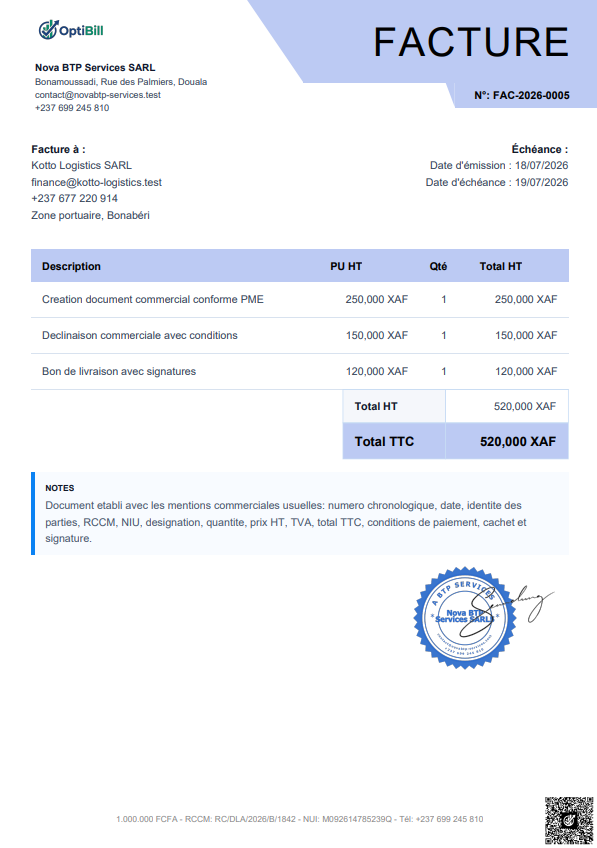
A convincing quote, converted into an invoice, then followed until it is paid. Every document carries a QR code your customer can scan to check that it is genuine.
 It’s your work.
File your documents by financial year and by month, search them with OCR and give your accounting firm access.
Explore the archivesKeep customer records and contact details in one place. Find the history of exchanges, activities and opportunity tracking.
Discover customer relationshipsDo you also sell products? Add products, inventory, checkout and sales, online, on WhatsApp or offline on Windows.
Explore business managementFOR ACCOUNTING FIRMS
Invite the SMEs you support and find
their invoices and
documents, month by month,
in your firm’s workspace.
Send an invitation to each SME you work with. It accepts from its Optibill account and its file joins your dashboard.
Browse each client’s archives by financial year and by month, then download a whole month as a single ZIP file.
Request the closing of a period, remind a client whose documents are missing and talk to them from the firm’s messages.
When you sign up, choose the “Accountant / Accounting firm” profile.
A PLAN FOR EVERY STAGE
Start free with 2 invoices,
then choose the plan that keeps
up with your business.
Document plans cover invoicing. Business management and Optibill Desktop have their own offers.
Public prices in FCFA (XAF) for the stated duration. Invoicing and document plans are separate from business management, which also includes the invoicing and document services.
Try Optibill with an account and create up to 2 free invoices before moving to a monthly plan.
| Plan | Price | Duration | Learn more |
|---|---|---|---|
| Free account | 0 FCFA | No paid subscription | Create an account |
| Billing | 500 FCFA | 1 month | See the plans |
| Invoices + quotes | 750 FCFA | 1 month | See the plans |
| Invoices + quotes + DN | 1,500 FCFA | 1 month | See the plans |
| All included | 3,000 FCFA | 1 month | See the plans |
| Quarterly | 7,500 FCFA | 3 months | See the plans |
| Annual | 24,000 FCFA | 12 months | See the plans |
| Plan | Price | Duration | Learn more |
|---|---|---|---|
| Monthly | 6,000 FCFA | 1 month | See the plans |
| Six months | 36,000 FCFA | 6 months | See the plans |
| Annual | 66,000 FCFA | 12 months | See the plans |
You choose and pay for your plan in your Optibill account.
Not
sure which plan fits your business? Let’s talk.
OPTIBILL GCOM BOT · ON WHATSAPP
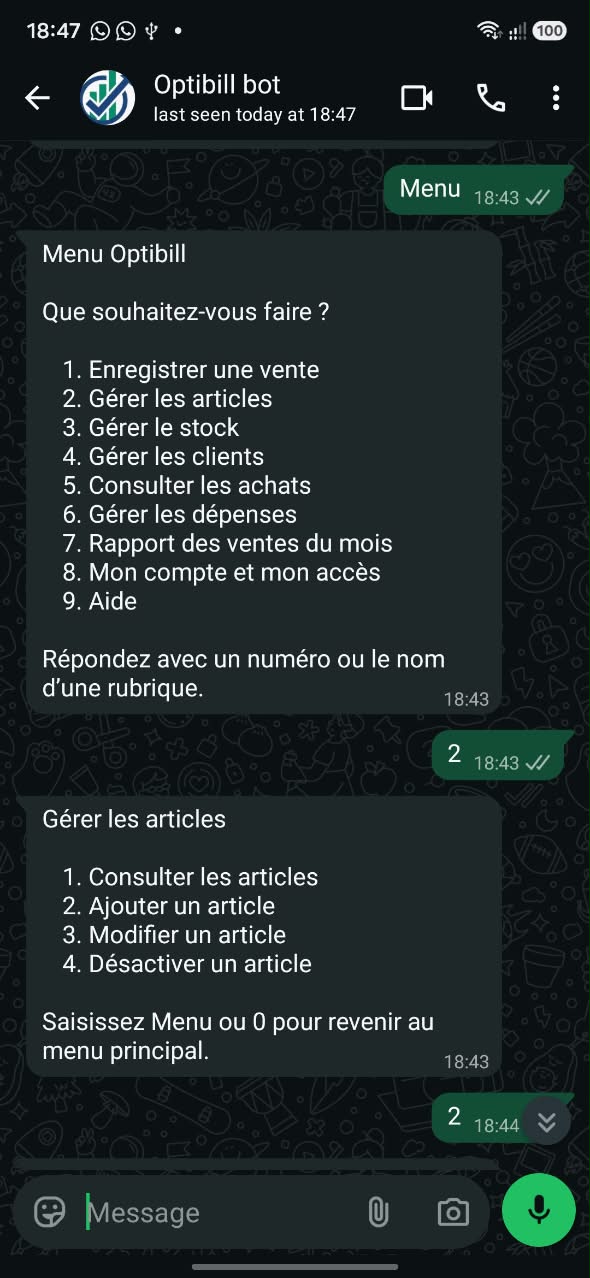
A product to add, stock to check, a sale to record? Find your business management in a conversation.
Optibill GCOM Bot guides you, message after message. Send your product details, attach its photo, then check the summary before you confirm.
You check. You confirm. It’s saved.
With a linked Optibill account and business management enabled. The bot needs an Internet connection and currently works in French only.
Products, stock, customers, sales… simply choose a section.
OPTIBILL LOCAL · FOR WINDOWS
At the counter, every sale counts. With the local version of business management, your checkout, products and data stay available without a connection.

LOCAL FIRST. THE CLOUD WHEN YOU DECIDE.
DOWNLOAD
Your checkout, products and inventory, on your computer.
Run your business management offline with the Windows app.
Via Google Drive · Confirm the download on the page that opens.
Full installation · Administrator rights required
THE IDEA BEHIND OPTIBILL
Behind every business,
there is someone giving it everything.
Ideas to bring to life. Customers to support. Days that go by too fast. And in the middle of it all, admin that sometimes takes over.
Optibill starts from a simple belief: your tools should help you move forward. By bringing your invoices, your payments and your accountant together, we want to give you back something precious: room to build your business.
Clarity to move forward.
BY YOUR SIDE AT EVERY STEP
Quotes, invoices and delivery notes in your own style, ready to share with your customers.
Payments, partial payments and overdue invoices: you know who owes you what.
Your documents are filed by month and available from your accounting firm’s workspace.
SMEs, small businesses, freelancers and entrepreneurs who want to produce professional quotes and invoices, track their payments and share their documents with their accountant. Accounting firms have a dedicated workspace to follow their clients. Shops can add business management.
The website and the Optibill web app are available in French and English. Optibill GCOM Bot on WhatsApp currently works in French only.
You can use your logo, stamp and signature, then generate your documents as PDF. Every invoice, quote and delivery note carries a QR code that lets anyone check it is genuine.
Record the payments received for each invoice, including partial payments. Optibill alerts you when an invoice becomes overdue, so you always know who owes you what.
Yes. Your accounting firm creates its workspace and invites you. It views your archives by financial year and by month, downloads them and can request the closing of a period. From your settings, you choose its access, read-only or management, and can remove it at any time.
Cameroon’s 2026 finance law provides for electronic invoicing for some VAT-liable transactions. The tax authority (DGI) has not yet published all the technical requirements. Optibill already produces digital invoices that can be verified with a QR code, and we are following the rollout of the official system.
Yes, with Optibill Local, the Windows version dedicated to business management. The checkout and data work on your computer. Uploading local data to the cloud can be enabled; it is not an automatic two-way sync.
Optibill GCOM Bot gives access to business management from WhatsApp: products and photos, stock, sales, customers, purchases, expenses and the monthly report. Operations are guided and changes are summarized before you confirm. You need a linked Optibill account, business management enabled and the right permissions. The bot needs the Internet and currently works in French; the offline version is available on Windows.
Tell us about your business and the modules you are interested in. We will agree on a time to present Optibill and answer your questions. You can request it by email or WhatsApp.
A free account lets you create your first 2 invoices before choosing a plan. Document plans and business management have separate price lists. Business management plans include access to Optibill Desktop. See the prices and included features to choose the right plan for your business.
SHALL WE GET ACQUAINTED?
Tell us about your business. We’ll show you what comes next.